

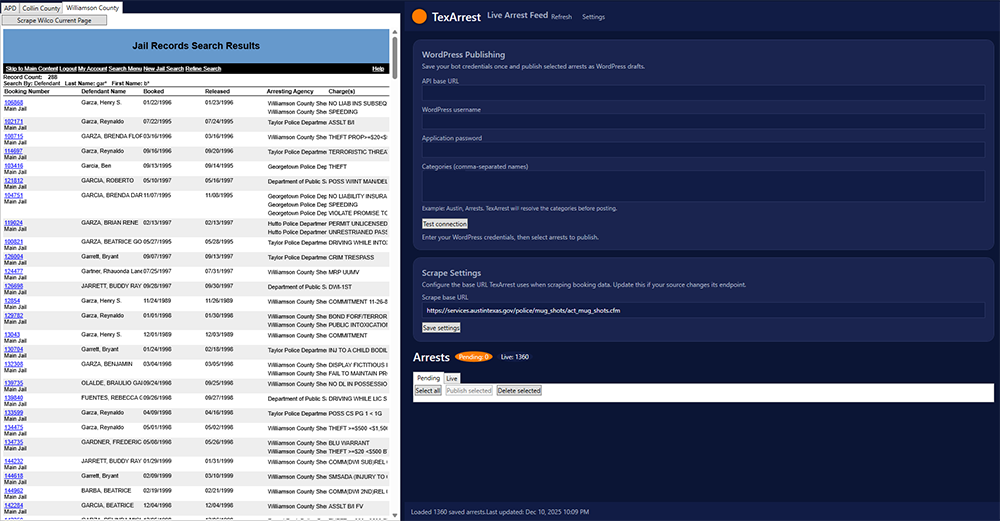
TexArrest is a data indexing and aggregation platform that processes publicly available Texas arrest records. The system organizes arrest data, offense categories, mugshots, and booking information into a clean, searchable structure.
TexArrest Core Features
- Automated arrest data indexing
- Offense categorization with parent/child groupings
- Mugshot retrieval when publicly available
- County-specific data feeds
- Mobile-friendly browsing
- Daily updates and optimizations
Data Sources
TexArrest gathers information exclusively from publicly accessible government websites and jail data systems. No private or confidential data is obtained.
Support
For questions or corrections, email: dev@byteomen.com

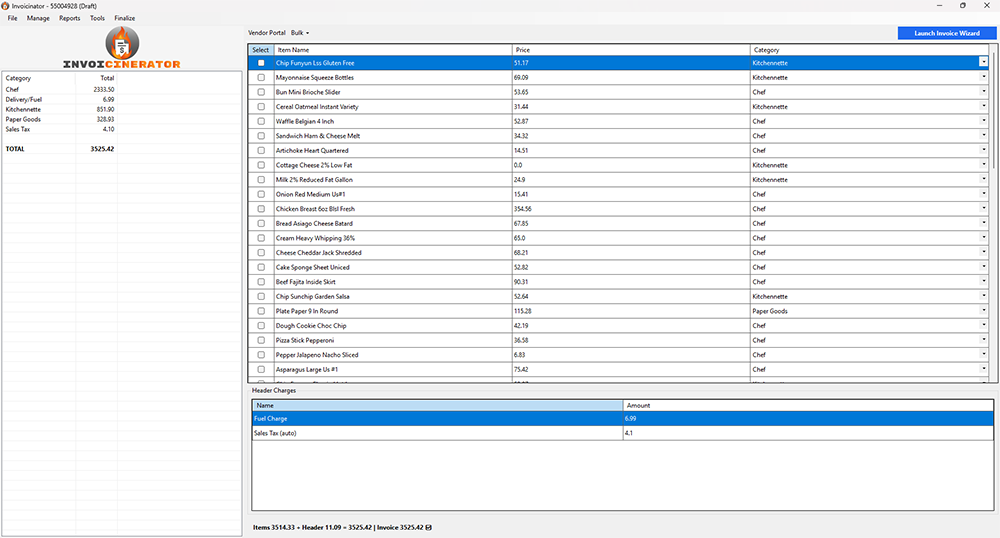
Invoicinator is a desktop application that automates invoice categorization, vendor reporting, and duplicate detection. Designed for administrative teams and small businesses, it transforms large invoice loads into organized datasets.
Invoicinator Key Features
- Automatic invoice categorization
- Duplicate detection and error handling
- Vendor summary report generation
- Tax and fuel cost separation
- Import and export options
- Local data handling and backups
Support
For technical help or questions: dev@byteomen.com


GameDayBaby is a mobile utility (currently in development) designed for college football fans who want fast access to schedules, matchups, preseason metrics, and live game insights. The app aims to consolidate essential information into a single, intuitive platform — giving fans a clean, data-focused way to follow their team throughout the season.
Planned Features
Team & Season Tools
- Full team schedules
- Opponent comparisons
- Home/away data
- Strength-of-schedule insights
- Preseason and postseason analysis
Multi-Screen / Grid Video Viewer (Experimental)
A next-generation viewing tool allowing users to:
- Watch multiple live streams simultaneously (where the user’s subscription allows)
- Arrange games in a customizable grid layout
- Track multiple matchups in real time
- Switch audio focus between streams
- Collapse and expand streams without leaving the grid
- Use picture-in-picture style controls for quick comparisons
This feature is designed for users who subscribe to various streaming services and want a unified interface for monitoring multiple games at once.
Note: GameDayBaby does not provide video content itself; users must connect their existing streaming service accounts.
User Experience
- Simple, intuitive navigation
- Clean data presentation
- Fast loading and minimal clutter
- Optimized layout for phone and tablet
Status
GameDayBaby is actively being developed for iOS and Android platforms.
Additional experimental features — including the grid-based multi-stream viewer — will roll out during late-stage development and testing.
Support
For questions or suggestions: support@byteomen.com

Culsi is a digital food-safety, labeling, and compliance platform designed for professional kitchens. It streamlines daily operational tasks, supports health-department standards, and reduces paperwork by converting routine food-safety requirements into fast, automated digital processes.
Built for restaurants, dining programs, cafeterias, and commercial foodservice environments, Culsi helps teams stay organized, compliant, and efficient.
Core Features
🔖 Smart Labeling System
- Automated date/time labeling
- Expiration and discard timers
- Customizable food prep labels
- Allergen and dietary icons
- Print-ready, consistent formatting
📊 Food-Safety Compliance Tools
- Time-as-a-Public-Health-Control (TPHC) logging
- Cold-holding and hot-holding temperature tracking
- Corrective action notes
- Digital logs for health inspectors
- Auto-generated compliance reports
🗂 Kitchen Workflow Automation
- Prep lists and production logs
- Batch-cooking timers
- Station-specific tracking
- Centralized dashboard for viewing all tasks
- Multi-device support for teams of any size
🧾 Digital Recordkeeping
- Automatically stores required logs
- Downloadable reports for inspections
- Daily and weekly summaries
- Export options for audit documentation
Who Culsi Is For
Culsi is built to support:
- Restaurants
- Institutional kitchens
- Catering operations
- Corporate dining programs
- Campus dining & hospitality
- Multi-location foodservice groups
Regardless of size, Culsi brings consistency, accuracy, and accountability to any kitchen.
Why Culsi
Traditional manual logs and handwritten labels lead to inconsistent tracking, lost records, and compliance challenges. Culsi removes friction by:
- Automating repetitive tasks
- Reducing health-code violations
- Improving accuracy and record keeping
- Keeping staff aligned and accountable
- Providing inspectors with organized digital history
Culsi is designed for high-pace environments where reliability and clarity matter.
Status
Culsi is actively being expanded with new features, integrations, and reporting enhancements. Additional modules and automation tools are in development.
Support
For questions, setup assistance, or feature requests, contact:
dev@byteomen.com or view the User Manual

Chefventory is a digital inventory, cost-control, and kitchen management platform designed for restaurants, cafeterias, and foodservice operations. It streamlines product tracking, reduces waste, and provides real-time insight into food usage, ordering needs, and operational costs.
Built for fast-paced culinary environments, Chefventory helps teams stay organized, efficient, and accurate—without relying on handwritten lists or outdated spreadsheets.
Core Features
📦 Real-Time Inventory Tracking
- Track stock levels across multiple storage locations
- Update counts quickly with mobile-friendly inputs
- Visual alerts for items nearing depletion
- Automatic discrepancy detection
🧮 Cost & Usage Insights
- Ingredient and product cost analysis
- Daily, weekly, and monthly usage summaries
- Waste tracking with notes and reasons
- Adjustable cost inputs to match vendor pricing
🧾 Order Planning & Vendor Management
- Automatically generate order sheets
- Track preferred vendor lists
- Manage unit conversions and pack sizes
- Export order guides for purchasing
🔍 Recipe-Level Costing (Optional Module)
- Yield-based recipe costing
- Auto-adjust costs when ingredient prices change
- Batch cost reporting
- Profitability and margin visibility
📱 Kitchen-Friendly Interface
- Optimized layout for tablets, phones, and desktop
- Large, high-contrast controls for kitchen use
- Offline-friendly workflows for low-signal areas
🗂 Multi-Location & Multi-User Support
- Role-based access
- Location-specific inventories
- Centralized oversight for management
- Audit logs for changes
Who Chefventory Is Built For
Chefventory supports the needs of:
- Restaurants & bars
- Cafeterias and dining halls
- Catering companies
- Institutional kitchens
- Multi-site operators
- Hospitality groups needing consistent control
No matter the scale of the operation, Chefventory reduces waste, simplifies ordering, and provides clear visibility into food costs.
Why Chefventory
Manual inventory processes are slow, inconsistent, and prone to errors. Chefventory solves this by:
- Automating repetitive tasks
- Providing accurate, real-time data
- Reducing food waste and unnecessary ordering
- Improving cost awareness
- Creating repeatable, standardized inventory routines
Chefventory helps kitchens operate smarter—not harder.
Status
Chefventory is actively being expanded with new cost-control modules, reporting features, and integrations. Additional workflow automation features are currently in development. Chefventory’s web version is LIVE!
Support
For questions, setup assistance, or feature suggestions, contact:
dev@byteomen.com